We just shipped the ImprovMX CLI — manage your domains, aliases, logs, and SMTP credentials from the terminal. Everything the dashboard does, now in your shell.
It also happens to work really well with Claude Code.
Why Claude Code + a CLI
Claude Code is Anthropic's coding agent. It runs in your terminal, executes shell commands, and handles multi-step tasks from plain English. If a CLI tool is installed on your system, Claude Code can use it — no plugins or configuration needed.
We designed the ImprovMX CLI with this in mind: predictable command structure, parseable output, no interactive prompts. That makes it usable by both humans and AI agents.
Examples
Set up a new domain
You:
"hey set up email forwarding on piedpiper.com — richard@, jared@, and a catch-all, all going to [email protected]. oh and set up SMTP for richard@ too"
Claude Code runs:
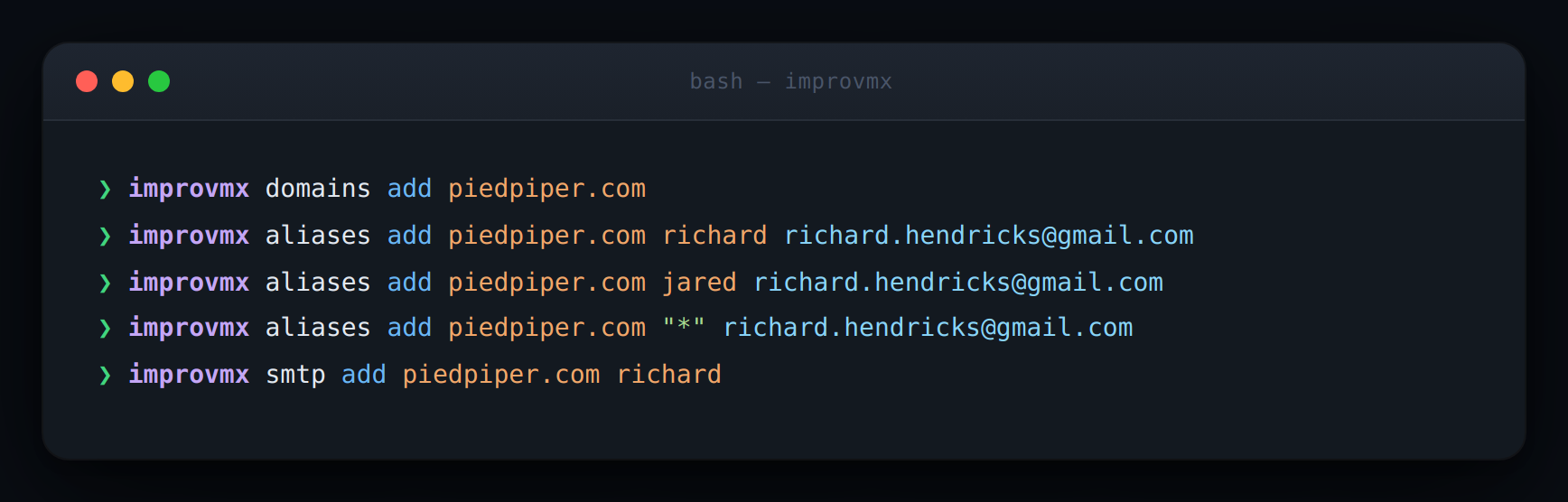
Full domain setup, no context switching out of your terminal.
Debug a missing email
You:
"someone from hooli says they emailed [email protected] yesterday and I never got it, can you check?"
Claude Code runs improvmx logs piedpiper.com, reads the events,
and tells you: the email from [email protected] soft-bounced at 3:47 PM,
retried, and delivered at 3:52 PM. Check spam.
No dashboard, no scrolling through logs, no reading event codes yourself.
Bulk operations
You:
"add a support@ alias on all my domains, forward them to [email protected]"
Claude Code runs improvmx domains list, loops through each
domain, creates the alias, and reports back. One sentence from you, done
across 15 domains.
Error recovery
If a command fails — domain not verified, alias already exists — Claude Code reads the error, explains it, and can walk you through fixing it (like which DNS records to add).
What makes this different from just typing commands
For a single command, nothing. The value is in multi-step tasks: Claude Code chains commands together, reads output to decide what to do next, and handles errors without you copy-pasting between docs and terminal.
It also has context. You can say "set up the same aliases we have on staging for production" and it will inspect your current config to figure out what that means.
Getting started
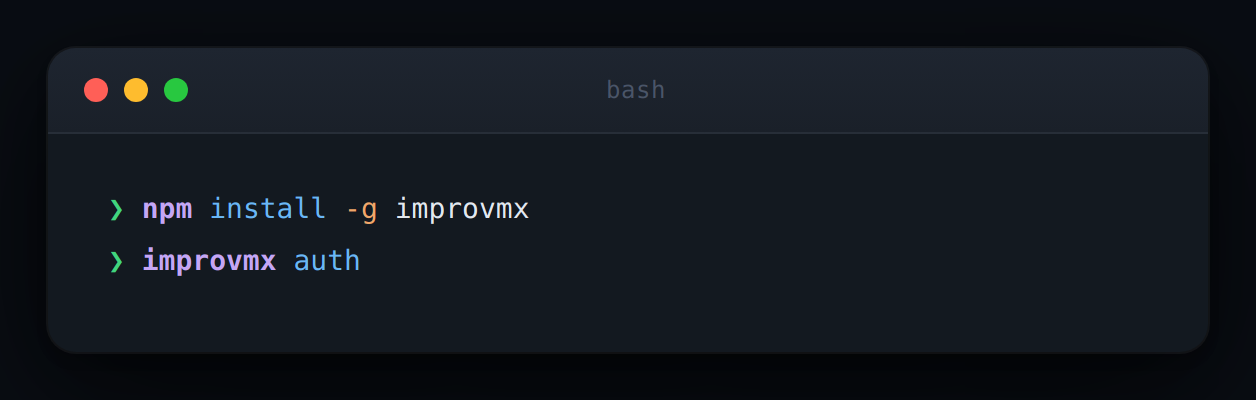
Then open Claude Code (claude in your terminal) and start asking
it to manage your email forwarding.
CLI is on GitHub. Not using ImprovMX yet? Start free.